Mapbox Map
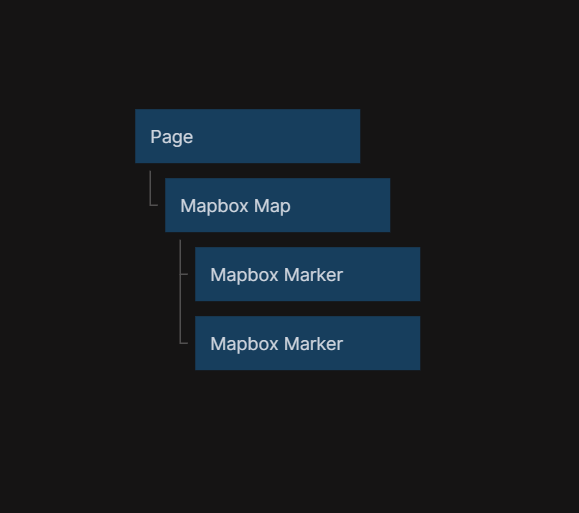
This node adds a map to the visual tree, using Mapbox. The map can be both interactive and static.
Inputs
Options
| Data | Description |
|---|---|
| Style | A path to a Mapbox Style. |
Other
| Data | Description |
|---|---|
| Interactive | Enable / Disable any interactions |
| Anti-alias | Enable anti-alias |
Coordinates
| Data | Description |
|---|---|
| Longitude | Sets the current active longitude. |
| Latitude | Sets the current active latitude. |
| Zoom | Sets the current active zoom. |
| Bearing | Sets the current active bearing. |
Geolocate
| Signal | Description |
|---|---|
| Center on user | Center the map on the user location, this only works with Geolocate enabled. |
Controls - Fullscreen
| Data | Description |
|---|---|
| Enable Fullscreen | Enable the fullscreen control. |
| Fullscreen Position | Change the control position. |
Controls - Geocoder
| Data | Description |
|---|---|
| Enable Geocoder | Enable the Geocoder control. |
| Geocoder Position | Change the control position. |
| Placeholder | Sets the placeholder in the search field. |
| Show Marker | Show a marker of the search result location. |
Controls - Geolocate
| Data | Description |
|---|---|
| Enable Geolocate | Enable the Geolocate control. |
| Geolocate Position | Change the control position. |
| Show Accuracy Circle | Show the accuracy circle of the user position. |
| Show User Heading | Show the user heading. |
| Show User Location | Show user location. |
| Track User Location | Track the user location. |
Controls - Navigation
| Data | Description |
|---|---|
| Enable Navigation | Enable the Navigation control. |
| Navigation Position | Change the control position. |
| Show Compass | Show the compass button in the control. |
| Show Zoom | Show the plus and minus buttons in the control. |
| Visualize Pitch | Visualize the pitch in the compass. |
Controls - Scale
| Data | Description |
|---|---|
| Enable Scale | Enable the Scale control. |
| Scale Position | Change the control position. |
| Max Width | Sets the max width of the control. |
| Unit | Sets the unit the control should display. |
Controls - Mapbox Draw
| Data | Description |
|---|---|
| Enable Mapbox Draw | Enable the Mapbox Draw control. |
| Mapbox Draw Position | Change the control position. |
| Enable Draw Keybindings | Enable Keybindings. |
| Enable Draw Touch | Enable Touch inputs. |
| Enable Draw Box Select | Enable Box Select. |
| Display Draw Controls | Show the Mapbox Draw controls. |
Controls - Mapbox Draw - Controls
| Data | Description |
|---|---|
| Points | Show the point button. |
| Line String | Show the line string button. |
| Polygon | Show the polygon button. |
| Trash | Show the trash button. |
| Combine Features | Show the combine features button. |
| Uncombine Features | Show the uncombine features button. |
Outputs
| Data | Description |
|---|---|
| (Coordinates) Longitude | The current active longitude. |
| (Coordinates) Latitude | The current active latitude. |
| (Coordinates) Zoom | The current zoom level of the map |
| (Coordinates) Bearing | The current active bearing. |
| (Map Clicked) Longitude | The longitude that where the user clicked last. To be used with the Click signal. |
| (Map Clicked) Latitude | The latitude that where the user clicked last. o be used with the Click signal. |
| Width | The with of the map container. |
| Height | The height of the map container. |
| Screen Position X | The amount of pixels between the left side of the window and the left side of the map container. |
| Screen Position Y | The amount of pixels between the top of the window and the top side of the map container. |
| Mapbox Object | Get the Mapbox object. |
| Mapbox Draw Object | Get the Mapbox Draw object. |
| Signal | Description |
|---|---|
| Click | Sends a signal when the map is clicked. |
| Map Loaded | Sends a signal when the map has finished loading, after it has been mounted in the app. |
| Map Moved | Sends a signal after the map in view has been moved. |
| Did Mount | Sends a signal when the map has been rendered in the app, before the map has been loaded. |
| Will Unmount | Sends a signal before the map will be removed from the visual tree. |